Product and Subsystem Security
Security Controls Map
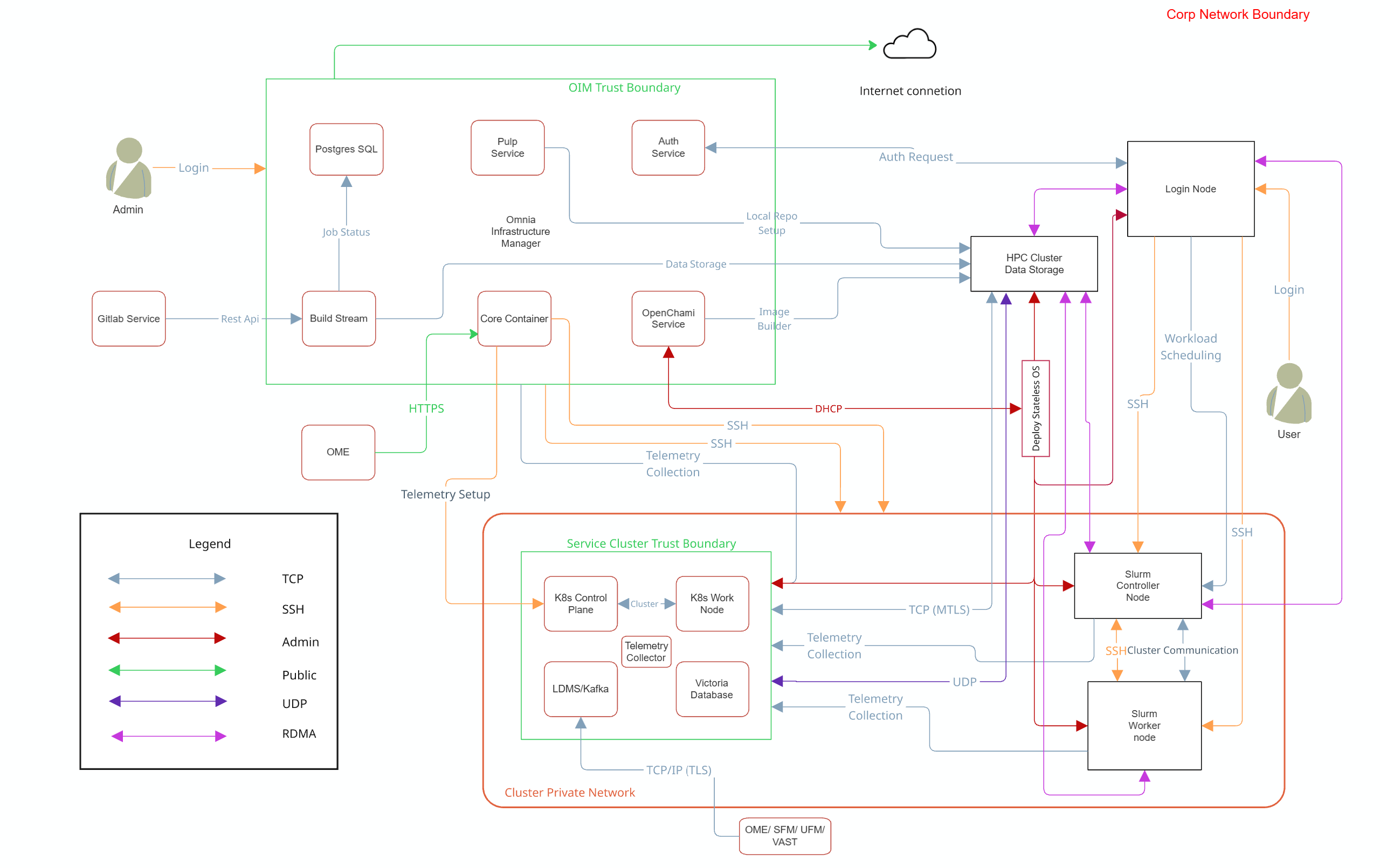
Note
Omnia supports NFS configured on the following external storage solutions for HPC cluster data storage:
- Dell PowerVault (iSCSI)
- Dell PowerScale (CSI)
- VAST (NFS)
Each storage system may require specific authentication credentials and configurations. Refer to the respective storage integration documentation for detailed setup instructions.
Omnia performs bare metal configuration to enable AI/HPC workloads. It uses Ansible playbooks to perform installations and configurations. iDRAC is supported for provisioning bare metal servers. Omnia enables provisioning of clusters via PXE using a mapping file (Mandatory) to dictate IP address/MAC mapping.
Omnia can be installed via CLI only. Slurm and Kubernetes are deployed and configured on the cluster. OpenLDAP is installed for providing authentication.
To perform these configurations and installations, a secure SSH channel is established between the management node and the following entities:
slurm_control_nodeslurm_nodelogin_nodeservice_kube_control_nodeservice_kube_node
Authentication
Omnia adheres to a subset of the specifications of NIST 800-53 and NIST 800-171 guidelines on the OIM and login node.
Omnia does not have its own authentication mechanism because bare metal installations and configurations take place using root privileges. Post the execution of Omnia, third-party tools are responsible for authentication to the respective tool.
Cluster Authentication Tool
In order to enable authentication to the cluster, Omnia installs OpenLDAP: an open source tool providing integrated identity and authentication for Linux networked environments. As part of the HPC cluster, the login node is responsible for configuring users and managing a limited number of administrative tasks. Access to the manager/head node is restricted to cluster administrators only.
Note
Omnia does not configure OpenLDAP users or groups.
Authentication Types and Setup
Key-Based authentication
Use of SSH authorized_keys
A password-less channel is created between the management station and compute nodes using SSH authorized keys. This is explained in the Security Controls Map.
Login Security Settings
User needs to provide the following credentials during cluster configuration. Once these credentials are provided, Omnia stores them in an encrypted Ansible Vault in input/omnia_config_credetials.yml.
They are hidden from external visibility and access.
- iDRAC/BMC (Username / Password)
- Provisioning OS (Password)
- slurmdb_password (Password)
- DockerHub (Username / Password)
- OpenLDAP (
openldap_db_username,openldap_db_password,openldap_config_username,openldap_config_password,openldap_monitor_password) - Telemetry (
mysql_user,mysql_password,mysql_root_password) - Minio S3 bucket (Password)
- Pulp (Password)
- CSI PowerScale credentials (Username / Password)
- LDMS Sampler (Password)
- Postgres (
postgres_user,postgres_password) - GitLab (
gitlab_root_password) - OME Discovery (
ome_username,ome_password) - UFM Telemetry (
ufm_username,ufm_password) - VAST Telemetry (
vast_username,vast_password)