Get Started
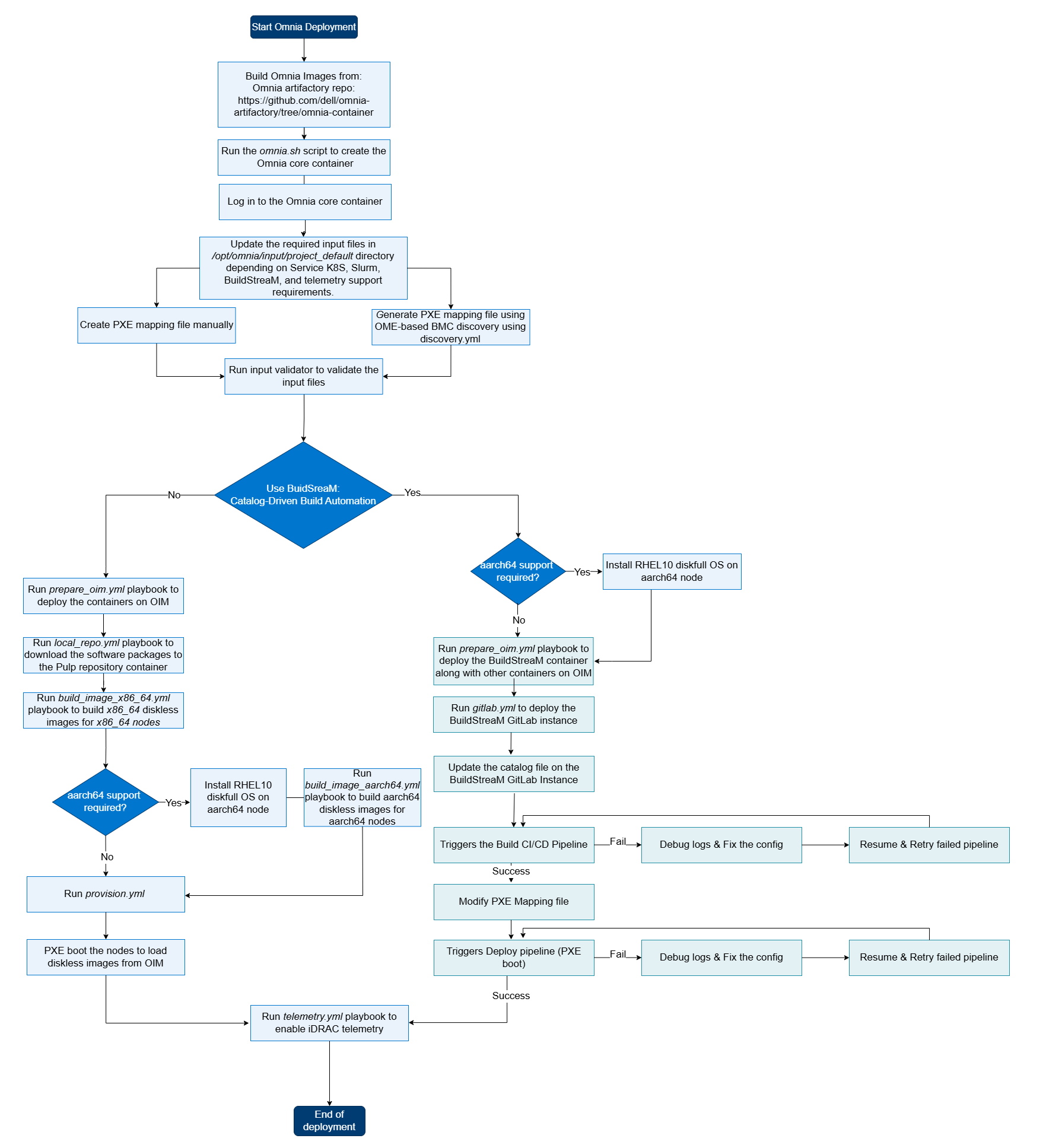
Choose your deployment path based on your cluster requirements, available hardware, and desired workload. Each path is a self-contained, end-to-end tutorial that takes you from a bare set of PowerEdge servers to a fully operational cluster.
Note
Before selecting a path, complete the Prerequisites Checklist to ensure your hardware, networking, and software environment are ready.
Deployment Paths at a Glance
| Path | Name | Workload | Nodes | Time | Description |
|---|---|---|---|---|---|
| A | Slurm Quickstart | Traditional HPC (Slurm) | 4+ | ~2 hrs | Overview page with links to detailed Slurm deployment guides. Covers Slurm setup, GPU provisioning, node management, configuration backup, and HPC benchmarks. Ideal for first-time users and large-scale HPC workloads. |
| B | K8S Telemetry Only | Kubernetes + Telemetry (no Slurm) | 5 | ~2 hrs | Deploys a 3-control-plane + 1-worker Kubernetes cluster with the complete telemetry pipeline (iDRAC metrics, LDMS, Kafka, VictoriaMetrics, Grafana). No Slurm. Use this when you need infrastructure monitoring without a job scheduler. |
| C | Full Deployment | Slurm + Service K8s + Telemetry | 8 | ~4 hrs | Production-grade deployment with Slurm scheduling, a highly available 3-node Kubernetes service cluster, LDAP/FreeIPA authentication, and full telemetry (iDRAC, Grafana, VictoriaMetrics). Best for teams running mixed HPC/AI workloads with monitoring requirements. |
| D | Buildstream Deployment | BuildStreaM (Catalog-Driven CI/CD) | 8+ | ~6 hrs | Automated, catalog-driven deployment using GitLab CI/CD pipelines. BuildStreaM reads a declarative catalog to provision and configure the entire cluster. Best for organizations with GitOps workflows or repeated, reproducible deployments at scale. |
Which Path Should I Choose?
"I just want Slurm running as fast as possible." Start with Slurm Quickstart (Path A). You can always add Kubernetes and telemetry later.
"I only need telemetry dashboards -- no job scheduler." Choose K8S Telemetry Only (Path B). This gives you iDRAC-to-Grafana visibility without the overhead of Slurm.
"I need a production cluster with monitoring and authentication." Go with Full Deployment (Path C). This is the canonical Omnia deployment that exercises every major subsystem.
"I want CI/CD-driven, repeatable infrastructure." Use Buildstream Deployment (Path D). BuildStreaM automates the entire lifecycle through GitLab pipelines and a declarative catalog.
Before You Begin
Every path assumes you have completed the items in Prerequisites Checklist. That page covers:
- Supported hardware and firmware versions
- OIM (management node) requirements (RAM, OS, Podman, NICs)
- Network switch configuration (admin + BMC VLANs)
- NFS / storage preparation
- BIOS and iDRAC settings on target nodes
- Required RHEL subscriptions and Docker credentials
Tip
Print or bookmark the Prerequisites Checklist -- it doubles as a day-of-deployment runbook you can hand to a datacenter technician.