Retry Pipeline Operations
Retry a BuildStreaM pipeline when one or more stages have failed. Before retrying, identify and resolve the issue that caused the failure.
Warning
Do not cancel a running GitLab pipeline or stage. Cancellation prevents some pipeline steps from executing, which leaves the BuildStreaM job in an intermediate, inconsistent state.
Prerequisites
- A Job exists with one or more stages in
FAILEDstate - The issue that caused the failure has been identified and resolved
- Configuration files (PXE mapping and input files) have been corrected if needed
Procedure
-
Navigate to Build → Pipelines and identify the failed pipeline.
-
Identify the stage that failed and review the error logs.
-
Resolve the issue that caused the failure:
- Fix configuration errors if present.
- Resolve network connectivity issues.
- Clear resource constraints if applicable.
- Address any other specific error conditions.
-
Click the Retry downstream pipeline icon on the stage to re-execute the entire pipeline.
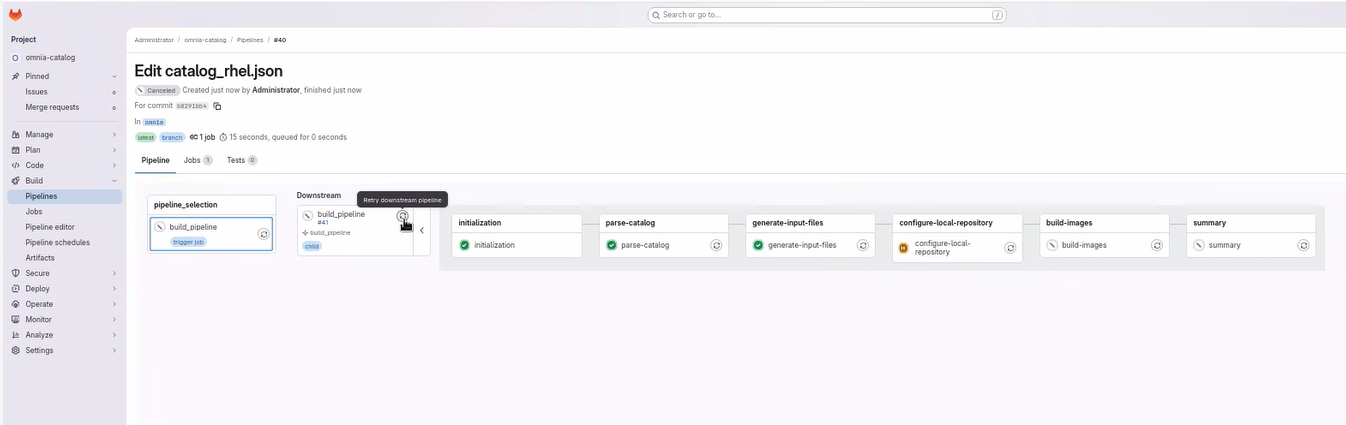
Note
This creates a new job and re-executes the entire pipeline from the beginning. It is recommended to retry the entire pipeline rather than an individual stage.
-
Verify that the pipeline completes successfully.
Verification
-
Check the GitLab pipeline status to ensure all stages passed.
-
Verify that a new Pipeline ID is created for the retry operation.
-
For build pipelines, verify that images were created successfully.
-
For deploy pipelines, verify that nodes were deployed correctly.
-
Compare results with the original failed pipeline to confirm the issue is resolved.
Next Steps
- Execute Deploy Pipeline -- Deploy pipeline operations
- Cleanup Operations -- Remove old Image Groups
Troubleshooting
- Retry button not displayed: The Retry button may not appear in certain failed pipeline stages. Initiate a restart from the parent pipeline to resolve this issue. This restarts the entire pipeline from the beginning.
- For additional issues, see BuildStreaM Troubleshooting.