Verify LDMS Telemetry Flow
This section outlines the steps to verify LDMS telemetry data flow from Kafka through Vector to VictoriaMetrics.
Verify LDMS Messages in Kafka
To verify that LDMS telemetry data is being successfully published to the ldms Kafka topic, do the following:
Log in to the Service Kubernetes Control plane.
Set the required variables using the following command:
KAFKA_LB_IP=<external IP of bridge-bridge-lb service>
TOPIC=ldms
GROUP=ldms-consumer-group
INSTANCE=ldms-consumer-1
Create a Kafka consumer using the following command:
KAFKA_LB_IP=<external load balancer IP of the bridge-bridge-lb service>
curl -X POST http://$KAFKA_LB_IP:8080/consumers/ldms-consumer-group \
-H 'content-type: application/vnd.kafka.v2+json' \
-d '{
        "name": "ldms-consumer-1",
        "format": "json",
        "auto.offset.reset": "latest",
        "enable.auto.commit": true
    }'
To view the list of LDMS Kafka topics configured, use the following command:
curl -s -X GET "http://$KAFKA_LB_IP:8080/topics" | jq '.'
Subscribe the consumer to the LDMS topic using the following command:
curl -X POST http://$KAFKA_LB_IP:8080/consumers/ldms-consumer-group/instances/ldms-consumer-1/subscription \
-H 'content-type: application/vnd.kafka.v2+json' \
-d '{"topics": ["ldms"]}'
Consume messages from the topic using the following command:
while true; do curl -X GET http://$KAFKA_LB_IP:8080/consumers/ldms-consumer-group/instances/ldms-consumer-1/records \
-H 'accept: application/vnd.kafka.json.v2+json' | jq '.' ;  sleep 2; done
If telemetry is flowing correctly, the output contains JSON-formatted LDMS telemetry records.
Note
When new nodes are added, ensure the nodes are up and cloud-init has completed successfully (check /var/log/cloud-init-output.log on each node). Then, create a new Kafka consumer group with a unique name (e.g., ldms-new-nodes-group) to verify metrics from the newly added nodes. Wait 2-3 minutes after discovery completes before checking.
Verify LDMS Metrics in VictoriaMetrics via Vector
To verify that LDMS telemetry data is being successfully consumed from Kafka by Vector-LDMS and routed to VictoriaMetrics, do the following:
Verify that the Vector-LDMS pod is running:
kubectl get pods -n telemetry | grep vector-ldms

Verify that the vmagent-vector pod is running:
kubectl get pods -n telemetry | grep vmagent-vector

Verify that the VictoriaMetrics service is running:
kubectl get service -n telemetry | grep vm

Note the External IP and port number of the VictoriaMetrics service. The external IP and port number will be used to access the VictoriaMetrics UI (VMUI).
Access the VMUI in a web browser using:
https://<external vmselect loadbalancer IP>:8481/select/0/vmui
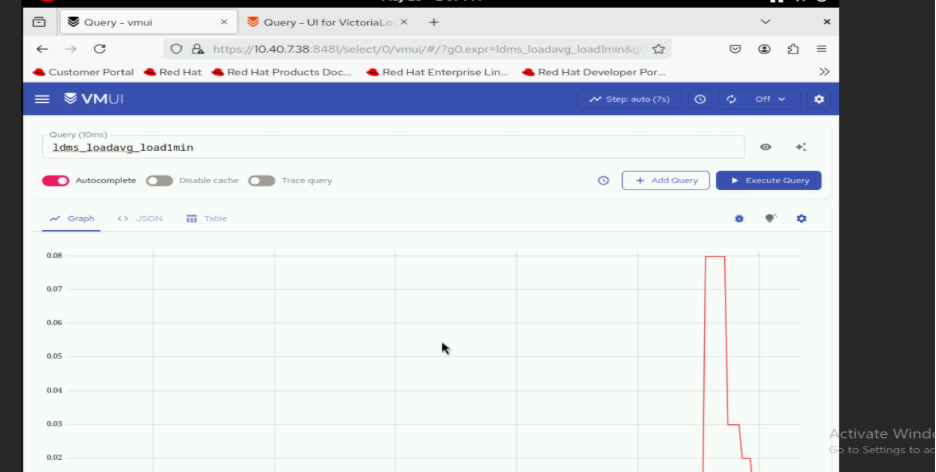
Verify that metrics are reaching VictoriaMetrics by querying the VMUI or using PromQL queries. For example, the following query displays LDMS-related metrics:
{__name__=~"ldms_.*"}
Verify Kafka TLS Connectivity
To verify TLS connectivity for Kafka, run the Kafka TLS test job to verify that certificates, truststores, keystores, and mTLS communication are functioning correctly:
cd /<nfs client mount path of the service k8s cluster>/telemetry/deployments/test
kubectl apply -f kafka.tls_test_job.yaml
After the job completes, check the logs to confirm that the TLS connection is successful:
kubectl logs kafka-tls-test-xxx -n telemetry
If you have any feedback about Omnia documentation, please reach out at omnia.readme@dell.com.