Omnia Deployment Requirements
This section outlines the key requirements for the components used by Omnia to deploy HPC clusters. For more information about the supported devices and software, see Support Matrix.
NFS Server
If PowerScale is configured as the NFS server using NFSv4 protocol, the following settings must be enabled on the PowerScale cluster to prevent file ownership from displaying as nobody:nobody:
- From the PowerScale web interface, navigate to Protocols > NFS > Zone settings and enable:
nfsv4-no-names = true
nfsv4-no-domain = true
nfsv4-no-domain-uids = true
nfsv4-allow-numeric-ids = true
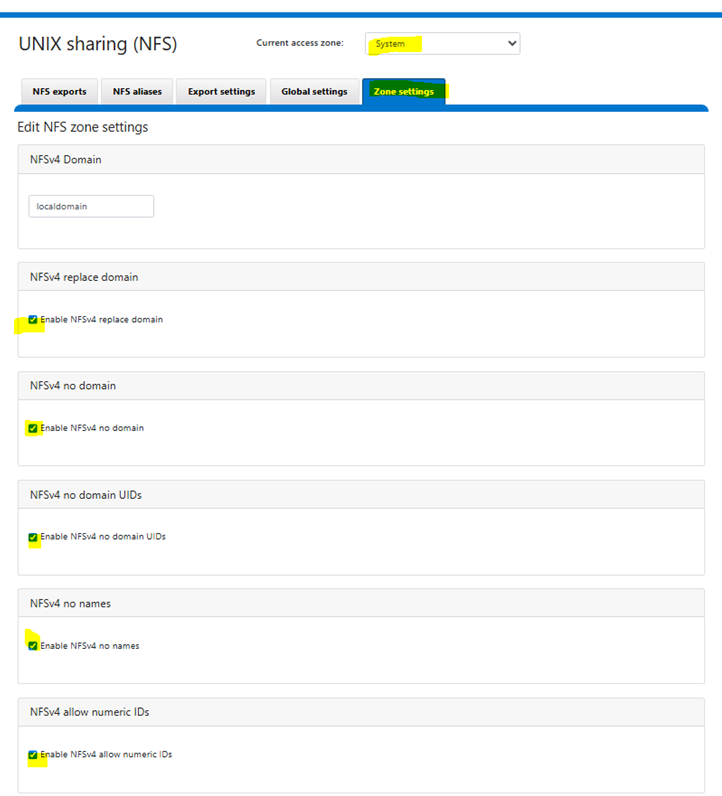
Alternatively, run the following CLI command:
isi nfs settings zone modify \
  --nfsv4-no-names=true \
  --nfsv4-no-domain=true \
  --nfsv4-no-domain-uids=true \
  --nfsv4-allow-numeric-ids=true \
  --zone=System
- This configuration ensures the following:
PowerScale sends numeric UIDs/GIDs instead of string-based identity (user@domain), which eliminates the nobody:nobody ownership issue caused by NFSv4 domain mismatch.
Ensure that UID/GID mappings are consistent across all NFS client nodes and the PowerScale cluster. Since numeric ID mode bypasses name-based identity resolution, mismatched UIDs/GIDs between clients will result in incorrect file ownership.
This setting degrades NFSv4 ACL support. If your environment requires NFSv4 ACLs, consider aligning the NFSv4 domain between PowerScale and all clients instead.
For more details, see Dell KB 000023023.
Choose an NFS server located outside your cluster.
The NFS share has 755 permissions and
no_root_squashis enabled during mount.To enable
no_root_squash, edit the/etc/exportsfile on the NFS server and include the option for the exported path, run the following command:/<your_exported_path> *(rw,sync,no_root_squash,no_subtree_check)
Ensure that the external NFS share is accessible from all nodes (both diskless and diskful) and is reachable via the admin network.
NFS Server for K8s
Minimum NFS for Kubernetes is 200 GB. The storage is recommended based on small cluster deployments. Increase the storage based on cluster size and telemetry data.
Ensure that there is a dedicated mount point for each NFS.
NFS Server for Slurm
Minimum NFS for Slurm is 50 GB. Increase the storage based on job data.
Ensure that there is a dedicated mount point for each NFS.
NFS Server for Omnia Infrastructure Manager (OIM)
Omnia recommends using an NFS share with at least 200 GB storage for OIM and cluster configuration.
Ensure that there is a dedicated mount point for each NFS.
PowerScale S3 Storage
PowerScale cluster must be deployed within the admin subnet and should be accessible from all cluster nodes.
Omnia uses HTTP access only when connecting to PowerScale, using the default port 9020.
Ensure both S3 and HTTP services are enabled in the S3 bucket configuration.
Ensure that valid S3 Access Key ID and S3 Secret Access Key are provided for authentication when accessing the PowerScale S3 service.
S3 Access Key ID and S3 Secret Access Key are tightly associated with the S3 buckets. You need S3 Access Key ID and S3 Secret Access Key to access the S3 buckets created using the key.
For detailed configuration instructions, see PowerScale S3 configuration.
Networking
Ensure admin and BMC switches are configured and reachable.
InfiniBand
Before deploying Omnia on clusters using InfiniBand (IB) networking, ensure that the Subnet Manager (SM) service is enabled and running on the InfiniBand switch or host.
Note
Failure to meet this prerequisite may result in InfiniBand ports on hosts remaining in the Initializing state and prevent IB communication between nodes.
Omnia Infrastructure Manager (OIM)
Choose a server outside of your intended cluster that meets the required Storage Requirements to function as the Omnia Infrastructure Manager (OIM).
Ensure the OIM has at least 64 GB RAM. To check the free RAM size, use the
free -hcommand. To check the disk space, use thedf -hcommand.Ensure that the OIM has the RHEL operating system installed with the Server with GUI Base Environment. For a complete list of supported RHEL versions, see the supported operating systems.
Ensure that Podman container engine is installed on the OIM.
The OIM must have access to public/internet (for downloading packages and images) network and admin (PXE) network.
Verify that Git is installed. If not, install it using:
dnf install git -y
All target bare-metal servers (cluster nodes) must be reachable from the OIM.
Make sure that the required ports are open on the OIM node for cluster deployment. For detailed information on the required ports, refer to the Omnia Ports.
The
omnia_coreandomnia_authcontainer images are deployed on the OIM. For instructions to deploy containers, see Deploy Omnia Core Container.
Aarch64 Node Prerequisites
Ensure that a disk is available to the aarch64 node for Full OS installation and you must install the OS manually.
Ensure that an IP address is assigned to the aarch64 node and the node has connectivity to the PXE network.
Ensure that the same NFS share used in OIM is reachable on the aarch64 node.
Repository
Enable the AppStream and BaseOS repositories via the RHEL subscription manager.
To pin specific RHEL version in the subscription manager, use the following commands:
subscription-manager release --show
subscription-manager release --set=10.0
Ensure that RHEL has an active subscription or is configured to access local repositories.
Verify that all repository URLs for the software packages are accessible — downloads will fail for inaccessible packages.
For RHEL systems without a subscription, the repository URLs for
x86_64_codeready-builder,x86_64_appstream, andx86_64_baseosare mandatory.Docker credentials are a mandatory requirement to pull in the essential packages during local repository deployment.
If the Slurm RPMS is already available, update the value in the URL of the
user_repo_url_x86_64oruser_repo_url_aarch64parameter in/opt/omnia/input/project_default/local_repo_config.yml.In a mixed architecture environment where the Slurm control node and compute nodes use different architectures (for example, control node with x86_64 and compute nodes with aarch64), ensure that Slurm binaries for both architectures are compiled and available in the user repository.
If the repository is hosted, use the URL created in the
local_repo_config.ymlfile.user_repo_url_x86_64:
- { url: "http://<ipaddress>/slurm-repo/x86_64", gpgkey: "", sslcacert: "", sslclientkey: "", sslclientcert: "", name: "slurm_custom" }
user_repo_url_aarch64:
- { url: "http://<ipaddress>/slurm-repo/aarch64", gpgkey: "", sslcacert: "", sslclientkey: "", sslclientcert: "", name: "slurm_custom" }
Run ansible-playbook local_repo/local_repo.yml.
Create Slurm repository build for x86_64. See Build Slurm repository for x86_64 and Host RPMS on Apache server.
Note
If any user repository is already hosted externally, update the value of the
user_repo_url_x86_64oruser_repo_url_aarch64parameter in/opt/omnia/input/project_default/local_repo_config.ymlwith the hosted repository URL based on the architecture.If the RPMs are already available but are not externally hosted, place the RPMs in the OIM and follow the steps in Host RPMS on Apache server. After hosting the RPMs, update the
user_repo_url_x86_64oruser_repo_url_aarch64parameter with the newly created repository URL.
Service Kubernetes Cluster
A minimum of three Kubernetes controller nodes and one kube node must be available.
Ensure that each Service Kubernetes Cluster node has at least 64 GB RAM.
ETCD Storage Configuration
ETCD storage can be configured on local disk or NFS based on the etcd_on_local_disk parameter in omnia_config.yml. For detailed configuration information, see Input Parameters for the Cluster and Set up High Availability (HA) Kubernetes on the Service Cluster.
When etcd_on_local_disk is set to true:
ETCD is deployed on the local disk of each Kubernetes service master node.
The
/var/lib/etcddirectory is mounted on the selected local disk.Disk Selection Priority: The system prioritizes BOSS card (BOSS-N1/N2) if available. If BOSS card is not present, it falls back to SSD or SATA disks.
RAID Configuration: BOSS cards must have RAID pre-configured (RAID 1 or RAID 10) before deployment. Omnia does not configure RAID automatically.
Minimum disk size of 20 GB is recommended for ETCD data partition.
Caution
Migration from NFS to local disk is not supported during upgrades. The etcd_on_local_disk configuration is only applicable for fresh installations.
When etcd_on_local_disk is set to false or omitted:
ETCD storage is provisioned using NFS.
No local disk configuration is performed for ETCD.
Ensure the NFS server is reachable and has sufficient storage for ETCD data.
Hardware Prerequisites for Local Disk Deployment:
Dell BOSS Card (BOSS-N1/N2) with pre-configured RAID 1 or RAID 10, OR
SSD or SATA disks if BOSS card is not available
Minimum disk size of 20 GB for ETCD data partition
RAID must be pre-configured on BOSS cards before deployment (Omnia does not configure RAID automatically)
Lightweight Directory Access Protocol (LDAP)
The LDAP server details are required to configure the
omnia_authcontainer and OpenLDAP as a proxy server. See Configure OpenLDAP as a proxy server.To deploy an external OpenLDAP server for authentication, ensure that the OpenLDAP server is deployed and configured with the required directory structure (users and groups). For the detailed steps, see External LDAP Deployment.
Lightweight Distributed Metric Service (LDMS)
Ensure that EPEL and AppStream repositories are configured and the python3-devel and python3-Cython packages are installed. To install the packages, run the following command:
sudo dnf install -y python3-devel python3-Cython
The LDMS RPM must be available in the user repository, and the
ldms.jsonfile should be updated accordingly. If the LDMS RPM is not available, refer to Building LDMS PRODUCER RPM Package for instructions on building LDMS RPMs.If the LDMS RPMS are already available, update the value (<hosted LDMS repository url>) in the URL of the
user_repo_url_x86_64oruser_repo_url_aarch64parameter in/opt/omnia/input/project_default/local_repo_config.yml.If the repository is hosted, use the URL created in the
local_repo_config.ymlfile.user_repo_url_x86_64:
{ url: "http://<ipaddress>/ldms-repo/x86_64", gpgkey: "", sslcacert: "", sslclientkey: "", sslclientcert: "", name: "ldms" }
user_repo_url_aarch64:
{ url: "http://<ipaddress>/ldms-repo/aarch64", gpgkey: "", sslcacert: "", sslclientkey: "", sslclientcert: "", name: "ldms" }
Run
ansible-playbook local_repo/local_repo.yml.
Slurm
Ensure that each slurm compute node has at least 64 GB RAM.
In a mixed architecture environment where the Slurm control node and compute nodes use different architectures (for example, control node with x86_64 and compute nodes with aarch64), ensure that Slurm binaries for both architectures are compiled and available in the user repository.
The Slurm RPM must be available in the user repository. If the Slurm RPM is not available, refer to Slurm Quick Start Administrator Guide for instructions on building Slurm RPMs.
If the Slurm RPMS are already available, update the value (<hosted slurm repository url>) in the URL of the
user_repo_url_x86_64oruser_repo_url_aarch64parameter in/opt/omnia/input/project_default/local_repo_config.yml.If the repository is hosted, use the URL created in the
local_repo_config.ymlfile.user_repo_url_x86_64:
- { url: "<hosted slurm repository url>", gpgkey: "", sslcacert: "", sslclientkey: "", sslclientcert: "", name: "slurm_custom" }
user_repo_url_aarch64:
- { url: "<hosted slurm repository url>", gpgkey: "", sslcacert: "", sslclientkey: "", sslclientcert: "", name: "slurm_custom" }
Run
ansible-playbook local_repo/local_repo.yml.Create Slurm repository build for x86_64. See Build Slurm repository for x86_64 and Host RPMS on Apache server.
After Slurm RPMS are generated, change the rpms in corresponding role accordingly if the rpm names are not matching with rpms in
input/config/x86_64/rhel/10.0/slurm_custom.json.
HPC Benchmark Image Layer
Omnia supports an HPC Benchmark Image Layer for Slurm deployments.
This capability is runtime script-driven: - Provisioning deploys
pull_benchmarks.shandbenchmark_tools.listto/hpc_tools/scripts. - Runtime staging is executed via/hpc_tools/scripts/pull_benchmarks.sh.Benchmark artifacts are pulled from the local Pulp mirror path to
/hpc_tools/<tool>/.The feature is staging-only; Omnia does not compile or execute benchmark workloads.
Ensure Slurm shared storage (
/hpc_tools) is available and local repository content is prepared before runtime staging.
Operational notes
msr-safeisx86_64only and is automatically skipped onaarch64.If a destination directory already contains files, the tool is skipped to prevent overwrite.
Runtime summary and per-tool outcomes are logged at:
/var/log/pull_benchmarks.log
CUDA and DCGM Prerequisites for Slurm GPU Nodes
The following prerequisites must be satisfied before deploying Omnia on Slurm clusters where GPU-capable nodes are present. These apply in addition to general Slurm prerequisites.
Repository Requirements
CUDA repository: Provisioned automatically in the local Pulp repository as part of local_repo_config.yml execution. Slurm compute nodes must be able to reach this local repository; no separate CUDA repo setup is required.
DCGM repository: Also provisioned automatically in the local repository by local_repo_config.yml. No manual configuration is needed beyond ensuring local_repo_config.yml has run successfully.
DCGM Installation Configuration
DCGM installation is controlled through the metrics_enabled parameter in the telemetry_sources.dcgm section of the input/telemetry_config.yml file:
telemetry_sources:
  dcgm:
    metrics_enabled: true
For DCGM installation to happen, ensure that metrics_enabled is set to true.
NFS Requirements
The shared NFS path configured for Slurm HPC tools must be reachable from all Slurm compute nodes and all login/compiler nodes at provisioning time.
Minimum recommended space for the
hpc_tools/cudaNFS path is 30 GB.The NFS share must be exported with
no_root_squash.
Hardware Requirements
NVIDIA GPU hardware: Must be present on any Slurm node intended for GPU workloads. Nodes without GPU hardware are automatically skipped at runtime.
Note
If repositories are not reachable or the NFS path is unavailable at provisioning time, GPU setup will fail on affected nodes and the DCGM service will not be started. Refer to the Manual Recovery section for remediation steps.
BuildStreaM
A dedicated node is required for BuildStreaM GitLab deployment.
The node must have sufficient system resources for BuildStreaM (minimum 4 GB RAM, 2 CPU cores, 20GB free disk space)
GitLab requires a minimum of 2 CPU cores. More cores may be needed for production workloads.
Network connectivity for GitLab services.
Ensure that Omnia BuildStreaM container, PostgreSQL container, and Playbook Watcher service are deployed on the OIM node. See Prepare the Omnia Infrastructure Manager.
If you have any feedback about Omnia documentation, please reach out at omnia.readme@dell.com.