Retry Pipeline Operations
You can retry the pipeline if there are failures in the stages. Before retrying, identify and resolve the issue that caused the failure.
Note
Do not cancel a running GitLab pipeline or stage. Cancellation prevents some pipeline steps from executing, which leaves the BuildStreaM job in an intermediate, inconsistent state. Note that backend BuildStreaM tasks already in progress will continue running to completion regardless of the cancellation.
Prerequisites
Before retrying pipeline operations, ensure the following:
A Job exists with one or more stages in FAILED state
The issue that caused the failure has been identified and resolved
Configuration files (PXE mapping and input files) have been corrected if needed
Procedure
Navigate to Build → Pipelines and identify the failed pipeline.
Identify the stage that failed and review the error logs.
Resolve the issue that caused the failure:
Fix configuration errors if present.
Resolve network connectivity issues.
Clear resource constraints if applicable.
Address any other specific error conditions.
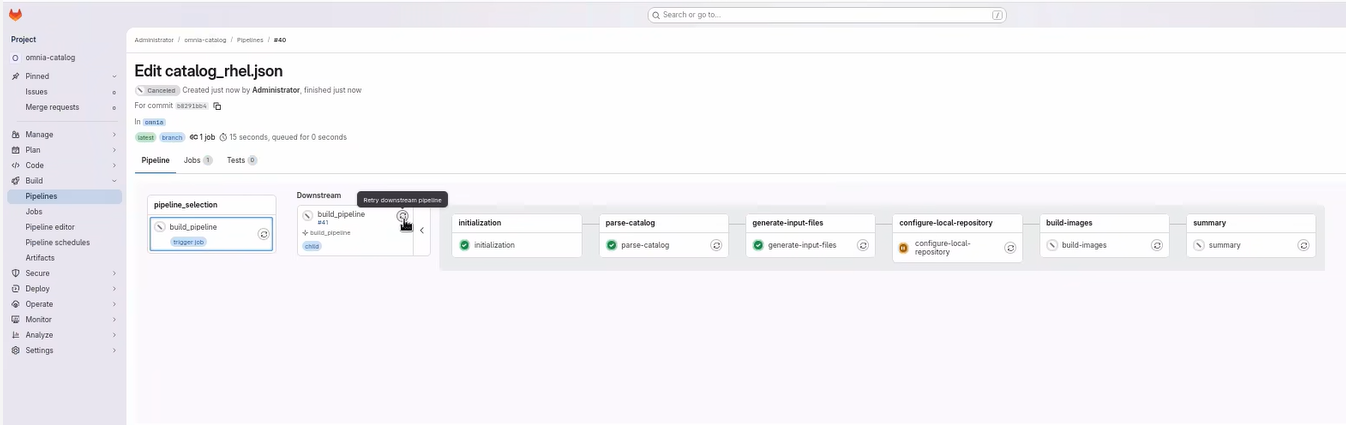
To retry the failed pipeline, click the Retry donwstream pipline icon on the stage that executes the entire pipeline.
Note
This creates a new job and re-executes the entire pipeline from the beginning. It is recommended to retry the entire pipeline rather than individual stage.
Verify that the pipeline completes successfully.
Verification
Check the GitLab pipeline status to ensure all stages passed.
Verify the new Pipeline ID is created for the retry operation.
For build pipelines, verify that images were created successfully.
For deploy pipelines, verify that nodes were deployed correctly.
Compare results with the original failed pipeline to confirm the issue is resolved.