Provision
⦾ Why are some target servers not reachable after PXE booting them?
Potential Causes:
The server hardware does not allow for auto rebooting
The process of PXE booting the node has stalled.
Resolution:
Login to the iDRAC console to check if the server is stuck in boot errors (F1 prompt message). If true, clear the hardware error or disable POST (PowerOn Self Test).
Hard-reboot the server to bring up the server and verify that the boot process runs smoothly. (If it gets stuck again, disable PXE and try provisioning the server via iDRAC.)
⦾ Why does PXE boot fail with tftp timeout or service timeout errors?
Potential Causes:
Two or more servers in the same network.
The target cluster node does not have a configured PXE device with an active NIC.
Additional NIC connected might cause network issues.
Resolution:
On the server, go to BIOS Setup -> Network Settings -> PXE Device. For each listed device (typically 4), configure an active NIC under
PXE device settings.Remove the Additional NIC and connect the NIC after the node is booted.
⦾ Why does the discovery.yml playbook execution fail at task: prepare_oim needs to be executed ?
Potential Cause: The OpenCHAMI container is not up and running.
Resolution: Perform a cleanup using oim_cleanup.yml and re-run the prepare_oim.yml playbook to bring up the OpenCHAMI containers. After prepare_oim.yml playbook has been executed successfully, re-deploy the cluster using the steps mentioned in the Omnia deployment guide.
⦾ Why do OpenCHAMI smd commands fail with certificate error?

Potential Causes: This issue is because of OpenCHAMI certificate expiration. After sometime, the certificate expires and loses the validity because of which OpenCHAMI commands do not run.
Resolution: As part of discovery.yml execution, certificate updation is being taken care. However, if user still faces this issue, they can update the OpenCHAMI certificate manually by running the following command on OIM:
sudo openchami-certificate-update update <OIM_hostname>.<Domain_Name>
sudo systemctl restart openchami.target
⦾ Why ochami commands fail with token error?

Potential Causes: This issue is because of Access Token getting expired after sometime.
Resolution: Manually renew the access token by running the below command on OIM:
export <OIM_hostname>_ACCESS_TOKEN=$(sudo bash -lc 'gen_access_token')
⦾ Why am I unable to do ssh to the booted nodes via omnia_core container?
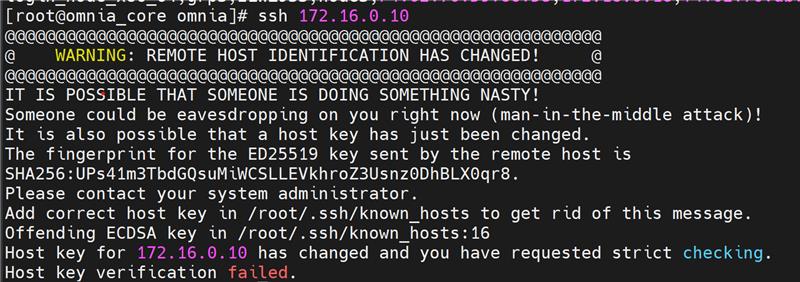
Potential Causes: This issue is due to SSH host key mismatch.
Resolution: User needs to manually run the below command inside omnia_core container:
ssh-keygen -R <node_admin_ip>
This removes all SSH entries for that IP from your local ~/.ssh/known_hosts file.
⦾ Why are the hostname and root password not configured on the nodes after boot?
Potential Causes: Cloud-init is not properly loaded on the target servers during provisioning. For more information, see Inconsistent cloud-init behavior with multiple node group configurations.
Resolution: Wait for 5 minutes and retry provisioning the node. If the issue persists, redeploy the cluster after running the oim_cleanup.yml playbook.
If you have any feedback about Omnia documentation, please reach out at omnia.readme@dell.com.