Product and Subsystem Security
Security Controls Map
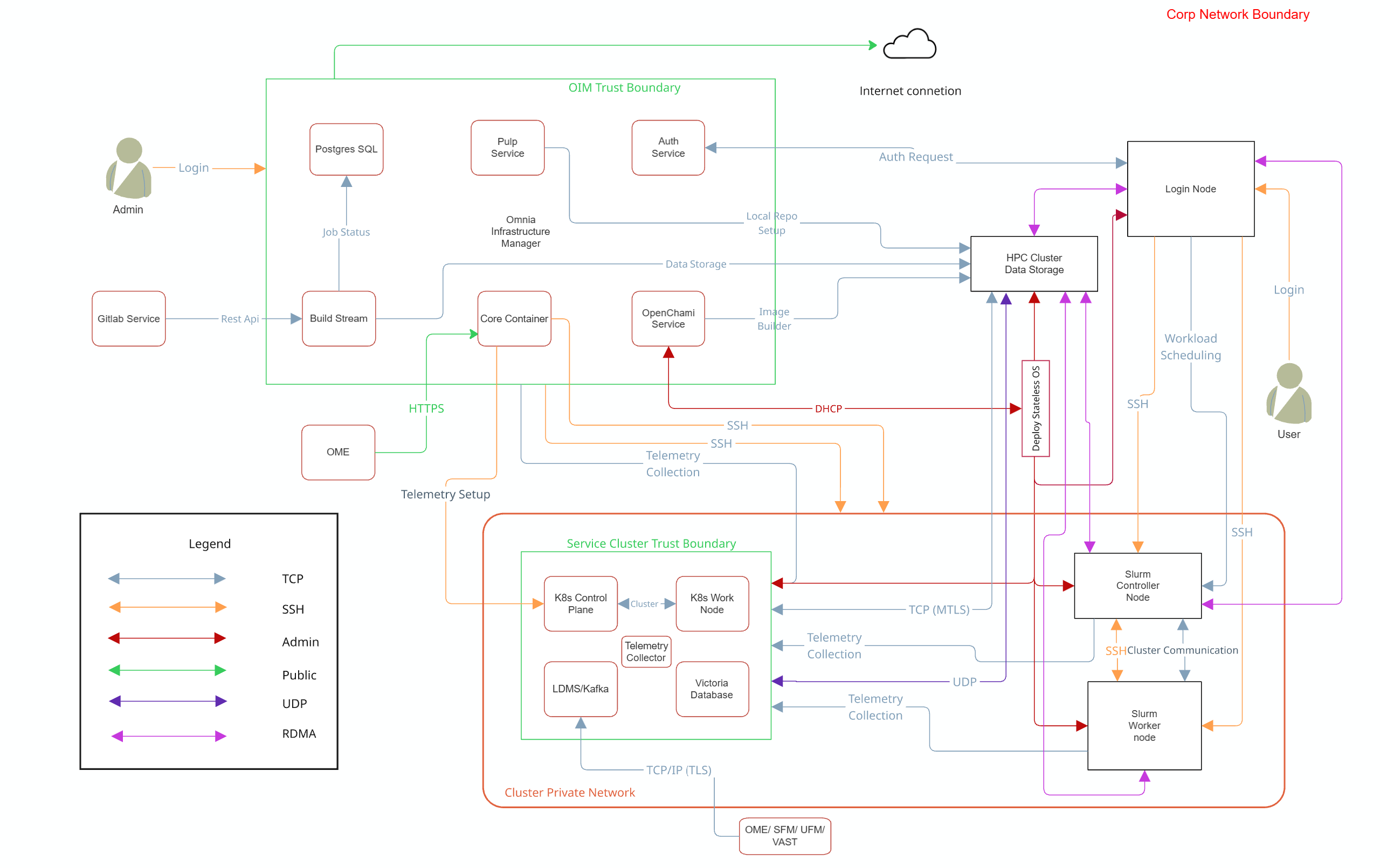
Note
Omnia supports NFS configured on the following external storage solutions for HPC cluster data storage:
Dell PowerVault (iSCSI)
Dell PowerScale (CSI)
VAST
Each storage system may require specific authentication credentials and configurations. Refer to the respective storage integration documentation for detailed setup instructions.
Omnia performs bare metal configuration to enable AI/HPC workloads. It uses Ansible playbooks to perform installations and configurations. iDRAC is supported for provisioning bare metal servers. Omnia enables provisioning of clusters via PXE using Mapping file [Mandatory] to dictate IP address/MAC mapping.
Omnia can be installed via CLI only. Slurm and Kubernetes are deployed and configured on the cluster. OpenLDAP is installed for providing authentication.
To perform these configurations and installations, a secure SSH channel is established between the management node and the following entities:
slurm_control_nodeslurm_nodelogin_nodeservice_kube_control_nodeservice_kube_node
Authentication
Omnia adheres to a subset of the specifications of NIST 800-53 and NIST 800-171 guidelines on the OIM and login node.
Omnia does not have its own authentication mechanism because bare metal installations and configurations take place using root privileges. Post the execution of Omnia, third-party tools are responsible for authentication to the respective tool.
Cluster Authentication Tool
In order to enable authentication to the cluster, Omnia installs OpenLDAP: an open source tool providing integrated identity and authentication for Linux networked environments. As part of the HPC cluster, the login node is responsible for configuring users and managing a limited number of administrative tasks. Access to the manager/head node is restricted to cluster administrators only.
Note
Omnia does not configure OpenLDAP users or groups.
Authentication Types and Setup
Key-Based authentication
Use of SSH authorized_keys
A password-less channel is created between the management station and compute nodes using SSH authorized keys. This is explained in the Security Controls Map.
Login Security Settings
User needs to provide the following credentials during cluster configuration. Once these credentials are provided, Omnia stores them in an encrypted Ansible Vault in input/omnia_config_credentials.yml. They are hidden from external visibility and access.
iDRAC/BMC (Username/ Password)
Provisioning OS (Password)
slurmdb_password (Password)
DockerHub (Username/Password)
OpenLDAP (
openldap_db_username,openldap_db_password,openldap_config_username,openldap_config_password,openldap_monitor_password)Telemetry (
mysql_user,mysql_password,mysql_root_password)Minio s3 bucket (Password)
Pulp (Password)
CSI PowerScale credentials (Username/Password)
LDMS Sampler (Password)
Postgres (
postgres_user,postgres_password)GitLab (
gitlab_root_password)OME Discovery (
ome_username,ome_password)UFM Telemetry (
ufm_username,ufm_password)VAST Telemetry (
vast_username,vast_password)
Authentication to External Systems
Third party software installed by Omnia are responsible for supporting and maintaining manufactured-unique or installation-unique secrets.
Network Security
Omnia configures the firewall as required by the third-party tools to enhance security by restricting inbound and outbound traffic to the TCP and UDP ports.
Network Exposure
Omnia uses port 22 for SSH connections, same as Ansible.
Firewall Settings
Omnia configures the following ports for use by third-party tools installed by Omnia.
Host Port Requirements
Port Number |
Protocol |
Service |
Type of Node |
|---|---|---|---|
22 |
TCP |
SSH |
All Nodes |
2222 |
TCP |
SSH — omnia_core relay |
Manager (OIM) |
2049 |
TCP/UDP |
NFS Server |
Manager (OIM) |
111 |
TCP/UDP |
RPC Bind |
Manager (OIM) |
20048 |
TCP/UDP |
NFS mountd |
Manager (OIM) |
123 |
UDP |
NTP |
Manager (OIM) |
53 |
TCP/UDP |
DNS — cluster |
Manager (OIM) |
9153 |
TCP |
DNS metrics |
Manager (OIM) |
53 |
TCP/UDP |
DNS — Podman internal |
Manager (OIM) |
67 |
UDP |
DHCP |
Manager (OIM) |
68 |
UDP |
DHCP bootpc |
Manager (OIM) |
69 |
UDP |
TFTP |
Manager (OIM) |
3702 |
UDP |
WS-Discovery (OS) |
Manager (OIM) |
5353 |
UDP |
mDNS (OS) |
Manager (OIM) |
631 |
TCP |
CUPS printing (OS) |
Manager (OIM) |
Podman Container Port Requirements
Port |
Protocol |
Service Name |
Type of Node |
|---|---|---|---|
2222 |
TCP |
Omnia Core |
Manager (OIM) |
2225 |
TCP |
Pulp Content Service |
Manager (OIM) |
5000 |
TCP |
OCI Registry |
Manager (OIM) |
9000 |
TCP |
MinIO S3 API |
Manager (OIM) |
9001 |
TCP |
MinIO Console |
Manager (OIM) |
Kubernetes Port Requirements
Port Number |
Protocol |
Service |
Type of Node |
|---|---|---|---|
6443 |
TCP |
Kubernetes API server |
Manager |
2379-2380 |
TCP |
etcd server client API |
Manager |
10251 |
TCP |
Kube-scheduler |
Manager |
10252 |
TCP |
Kube-controller manager |
Manager |
10250 |
TCP |
Kubelet API |
Compute |
30000-32767 |
TCP |
NodePort services |
Compute |
5473 |
TCP |
Calico services |
Manager/Compute |
179 |
TCP |
Calico services |
Manager/Compute |
4789 |
UDP |
Calico services |
Manager/Compute |
8285 |
UDP |
Flannel services |
Manager/Compute |
8472 |
UDP |
Flannel services |
Manager/Compute |
10256 |
TCP |
kube-proxy health check |
Manager + Compute |
7472 |
TCP |
MetalLB L2 speaker Prometheus metrics |
Manager + Compute |
7946 |
TCP |
MetalLB gossip/memberlist |
Manager + Compute |
2112 |
TCP |
kube-vip Prometheus metrics + health |
Manager |
10257 |
TCP |
Controller manager secure HTTPS port |
Manager |
10259 |
TCP |
Scheduler secure HTTPS port |
Manager |
10249 |
TCP |
kube-proxy Prometheus metrics |
Manager + Compute |
10248 |
TCP |
kubelet local health check |
Manager + Compute |
9099 |
TCP |
Calico Felix health check |
Manager + Compute |
53 |
TCP/UDP |
Kubernetes CoreDNS |
Manager |
443 |
TCP |
NFS StorageClass dynamic provisioner |
Compute |
45845 |
TCP |
CRI-O runtime service |
Manager/Compute |
18515-18520 |
TCP |
DOCA/OFED RDMA and InfiniBand communication port range |
Compute |
Slurm Port Requirements
Port |
Protocol |
Service Name |
Type of Node |
|---|---|---|---|
6817 |
TCP/UDP |
slurmctld |
Manager (Slurm) |
6818 |
TCP/UDP |
slurmd |
Compute (Slurm) |
6819 |
TCP/UDP |
slurmdbd |
Manager (Slurm) |
60001-63000 |
TCP |
Slurm SrunPortRange |
Manager + Compute |
3306 |
TCP |
MariaDB |
Manager |
OpenLDAP Port Requirements
Port Number |
Protocol |
Service Name |
Node |
|---|---|---|---|
80 |
TCP |
HTTP/HTTPS |
Manager/ Login_Node |
443 |
TCP |
HTTP/HTTPS |
Manager/ Login_Node |
389 |
TCP |
LDAP/LDAPS |
Manager/ Login_Node |
636 |
TCP |
LDAP/LDAPS |
Manager/ Login_Node |
Telemetry Port Requirements
Port |
Protocol |
Service Name |
Type of Node |
|---|---|---|---|
8161 |
TCP |
ActiveMQ Console |
Manager (Telemetry K8s) |
61613 |
TCP |
ActiveMQ STOMP (port 1) |
Manager (Telemetry K8s) |
61616 |
TCP |
ActiveMQ STOMP (port 2) |
Manager (Telemetry K8s) |
8082 |
TCP |
Telemetry Config UI |
Manager (Telemetry K8s) |
3306 |
TCP |
MySQL primary |
Manager (Telemetry K8s) |
33060 |
TCP |
MySQL X Protocol |
Manager (Telemetry K8s) |
9092 |
TCP |
Kafka broker plaintext |
Manager (Telemetry K8s) |
9093 |
TCP |
Kafka broker TLS |
Manager (Telemetry K8s) |
9094 |
TCP |
Kafka LoadBalancer |
Manager (Telemetry K8s) |
8443 |
TCP |
VictoriaMetrics service |
Manager (Telemetry K8s) |
8480 |
TCP |
VictoriaMetrics Insert LB |
Manager (Telemetry K8s) |
8481 |
TCP |
VictoriaMetrics Query LB |
Manager (Telemetry K8s) |
2112 |
TCP |
vmagent self-metrics |
Manager (Telemetry K8s) |
8429 |
TCP |
vmagent remote_write receiver |
Manager (Telemetry K8s) |
9427 |
TCP |
vlagent JSON Lines receiver |
Manager (Telemetry K8s) |
9481 |
TCP |
VictoriaLogs vlinsert |
Manager (Telemetry K8s) |
9491 |
TCP |
VictoriaLogs vlstorage health |
Manager (Telemetry K8s) |
9471 |
TCP |
VictoriaLogs vlselect query |
Manager (Telemetry K8s) |
8687 |
TCP |
vector-ldms health |
Manager (Telemetry K8s) |
9599 |
TCP |
vector-ldms metrics |
Manager (Telemetry K8s) |
8688 |
TCP |
vector-ome health |
Manager (Telemetry K8s) |
9600 |
TCP |
vector-ome metrics |
Manager (Telemetry K8s) |
514 |
TCP/UDP |
Syslog plaintext (VLAgent) |
Manager (Telemetry K8s) |
6514 |
TCP |
Syslog TLS (VLAgent) |
Manager (Telemetry K8s) |
6001-6100 |
TCP |
LDMS aggregator |
Manager (Telemetry) |
6001-6100 |
TCP |
LDMS store daemon |
Manager (Telemetry) |
10001-10100 |
TCP |
LDMS sampler |
Compute |
Build Stream Port Requirements
Port |
Protocol |
Service Name |
Type of Node |
|---|---|---|---|
8010 |
TCP |
Build Stream API |
Manager (OIM) |
DOCA/IB Port Requirements
Port |
Protocol |
Service Name |
Type of Node |
|---|---|---|---|
18515-18520 |
TCP/UDP |
DOCA/OFED RDMA |
Compute (IB nodes) |
OpenCHAMI Port Requirements
Port |
Protocol |
Service Name |
Type of Node |
|---|---|---|---|
8081 |
TCP |
HAProxy HTTP |
Manager (OIM) |
8443 |
TCP |
HAProxy HTTPS |
Manager (OIM) |
27779 |
TCP |
State Mgmt Daemon (SMD) |
Manager (OIM) |
27778 |
TCP |
Boot Script Service (BSS) |
Manager (OIM) |
5432 |
TCP |
PostgreSQL |
Manager (OIM) |
9000 |
TCP |
Step CA (PKI) |
Manager (OIM) |
4444/4445 |
TCP |
Hydra OAuth2 |
Manager (OIM) |
67/69 |
UDP |
CoreDHCP |
Manager (OIM) |
53 |
TCP/UDP |
CoreDNS |
Manager (OIM) |
Data Security
Omnia does not store data. The passwords Omnia accepts as input to configure the third party tools are validated and then encrypted using Ansible Vault. Run the following commands routinely on the OIM for the latest RHEL security updates.
yum update --security
For more information on the passwords used by Omnia, see Login Security Settings.
Auditing and Logging
Omnia creates and stores log files related to containers at <nfs_share_path>/omnia/log/. The events during the installation of Omnia are captured as logs. For different roles called by Omnia, separate log files are created as listed below:
Location |
Purpose |
|---|---|
/opt/omnia/log/core/playbooks/discovery.log |
Discovery logs |
/opt/omnia/log/core/playbooks/local_repo.log |
Local Repository logs |
/opt/omnia/log/core/playbooks/prepare_oim.log |
Prepare OIM Logs |
/opt/omnia/log/core/playbooks/provision.log |
Provision Logs |
/opt/omnia/log/core/playbooks/scheduler.log |
Scheduler Logs |
/opt/omnia/log/core/playbooks/telemetry.log |
Telemetry logs |
/opt/omnia/log/core/playbooks/utils.log |
Utility logs |
/opt/omnia/log/core/playbooks/credential_utility.log |
Credential utility logs |
/opt/omnia/log/openchami/*log |
OpenCHAMI playbook logs |
/opt/omnia/log/pulp/*log |
Pulp container logs |
/opt/omnia/log/local_repo/*log |
Local repo logs |
/opt/omnia/log/core/container/*log |
Core container logs |
/opt/omnia/log/core/playbooks/validation_omnia_project_default.log |
Omnia input validation report logs |
/opt/omnia/log/core/playbooks/input_validation.log |
Omnia input validation playbook logs |
Additionally, an aggregate of the events taking place during storage, scheduler and network role installation called omnia.log is created in /var/log.
There are separate logs generated by the third party tools installed by Omnia.
Logs
A sample of the omnia.log is provided below:
2021-02-15 15:17:36,877 p=2778 u=omnia n=ansible | [WARNING]: provided hosts
list is empty, only localhost is available. Note that the implicit localhost does not
match 'all'
2021-02-15 15:17:37,396 p=2778 u=omnia n=ansible | PLAY [Executing omnia roles]
************************************************************************************
2021-02-15 15:17:37,454 p=2778 u=omnia n=ansible | TASK [Gathering Facts]
*****************************************************************************************
*
2021-02-15 15:17:38,856 p=2778 u=omnia n=ansible | ok: [localhost]
2021-02-15 15:17:38,885 p=2778 u=omnia n=ansible | TASK [common : Mount Path]
**************************************************************************************
2021-02-15 15:17:38,969 p=2778 u=omnia n=ansible | ok: [localhost]
These logs are intended to enable debugging.
Note
The Omnia product recommends that product users apply masking rules on personal identifiable information (PII) in the logs before sending to external monitoring applications or sources.
Logging Format
Every log message begins with a timestamp and also carries information on the invoking play and task.
The format is described in the following table.
Field |
Format |
Sample Value |
|---|---|---|
Timestamp |
yyyy-mm-dd h:m:s |
2/15/2021 15:17 |
Process Id |
p=xxxx |
p=2778 |
User |
u=xxxx |
u=omnia |
Name of the process executing |
n=xxxx |
n=ansible |
The task being executed/ invoked |
PLAY/TASK |
PLAY [Executing omnia roles] TASK [Gathering Facts] |
Error |
fatal: [hostname]: Error Message |
fatal: [localhost]: FAILED! => {“msg”: “lookup_plugin.lines} |
Warning |
[WARNING]: warning message |
[WARNING]: provided hosts list is empty |
Network vulnerability scanning
Omnia performs network and application security scans on all modules of the product. Omnia additionally performs Blackduck scans on the open source softwares, which are installed by Omnia at runtime. However, Omnia is not responsible for the third-party software installed using Omnia. Review all third party software before using Omnia to install it.
If you have any feedback about Omnia documentation, please reach out at omnia.readme@dell.com.