Network Topology: Shared LAN on Motherboard (LOM) Setup
Note
The following diagram is for representational purposes only.
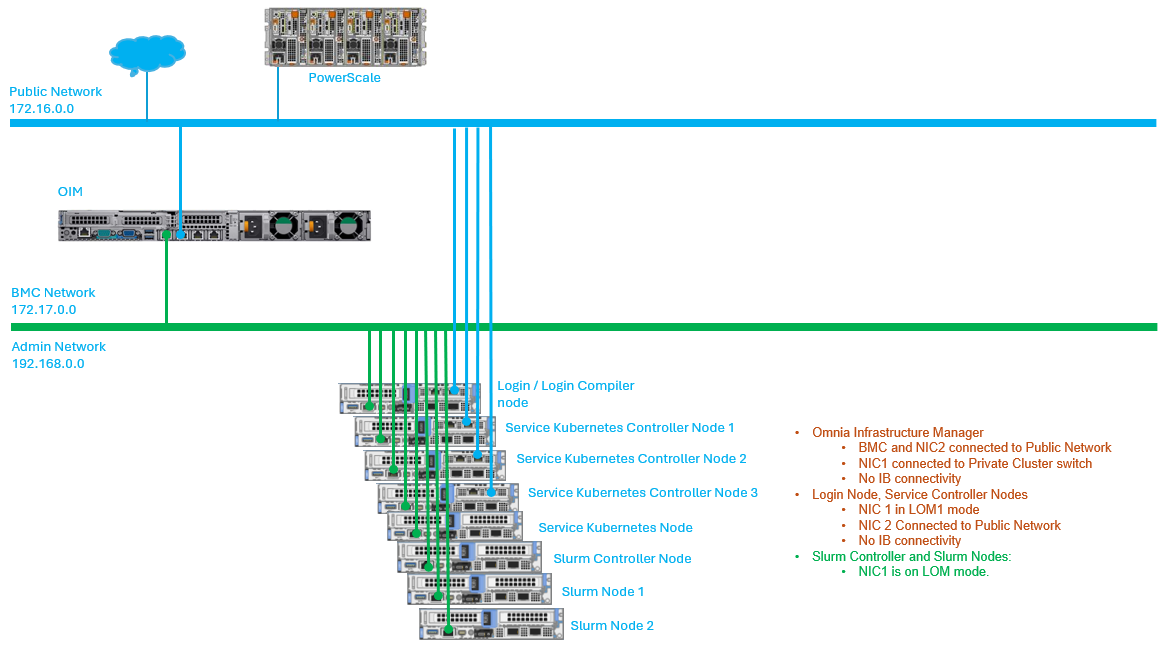
In a Shared LOM setup, the Administration and BMC logical networks share the same ethernet segment and physical connection.
Public Network (Blue line): This indicates the external public network which is connected to the internet. NIC2 of the OIM, Service cluster nodes, Service Kubernetes node, and Login node [optional] is connected to the public network.
Admin Network and BMC network (Green line): This indicates the admin network and the BMC network utilized by Omnia to provision the cluster nodes and to control the cluster nodes using out-of-band management. NIC1 of all the nodes are connected to the private switch.
Note
Omnia supports classless IP addressing, which allows the Admin network, BMC network, Public network, and the Additional network to be assigned different subnets.
Recommended Discovery Mechanism
If you have any feedback about Omnia documentation, please reach out at omnia.readme@dell.com.